Efficient Agent Trajectory Annotation with onPanda
Dynamically connect to agent environments and annotate multi-turn SFT and preference data with tool_calls and reasoning online
Existing agent observability and annotation tools (such as Potato and Argilla) mostly support assigning attributes or adding textual feedback to completed trajectories. However, editing trajectories to construct high-quality multi-turn agent SFT data presents two core challenges:
- Coupled environment state: Agent trajectories alternate between tool calls (
tool_calls) and environment feedback (toolmessages). Once a tool call in a given turn is modified, the original subsequent trajectory is usually no longer valid—the corrected call must be executed in the real environment, and generation must continue from the new feedback. - Complex output structure: In the era of reasoning models and agents, a single model response contains not only
content, but also lengthyreasoningchains and structuredtool_calls. Annotators must understand and edit both the reasoning process and tool arguments, making manual rewriting costly and annotation UI design challenging.
onPanda (Project Page) is an open-source LLM alignment data annotation tool built around the paradigm of correcting the generation process in real time rather than rewriting outputs after the fact. onPanda dynamically connects to real agent runtime environments, allowing annotators to efficiently edit reasoning, content, and tool_calls at the token level and produce SFT, preference, and token-level supervision data with high on-policy fidelity through real environment interaction.
Annotation interface and interaction
In onPanda, while reading the model output, annotators simply locate the first inappropriate token and either select a replacement from the model's top_logprobs candidates or double-click to type a correction directly. onPanda then truncates everything after that position and lets the model continue generating from the corrected prefix:
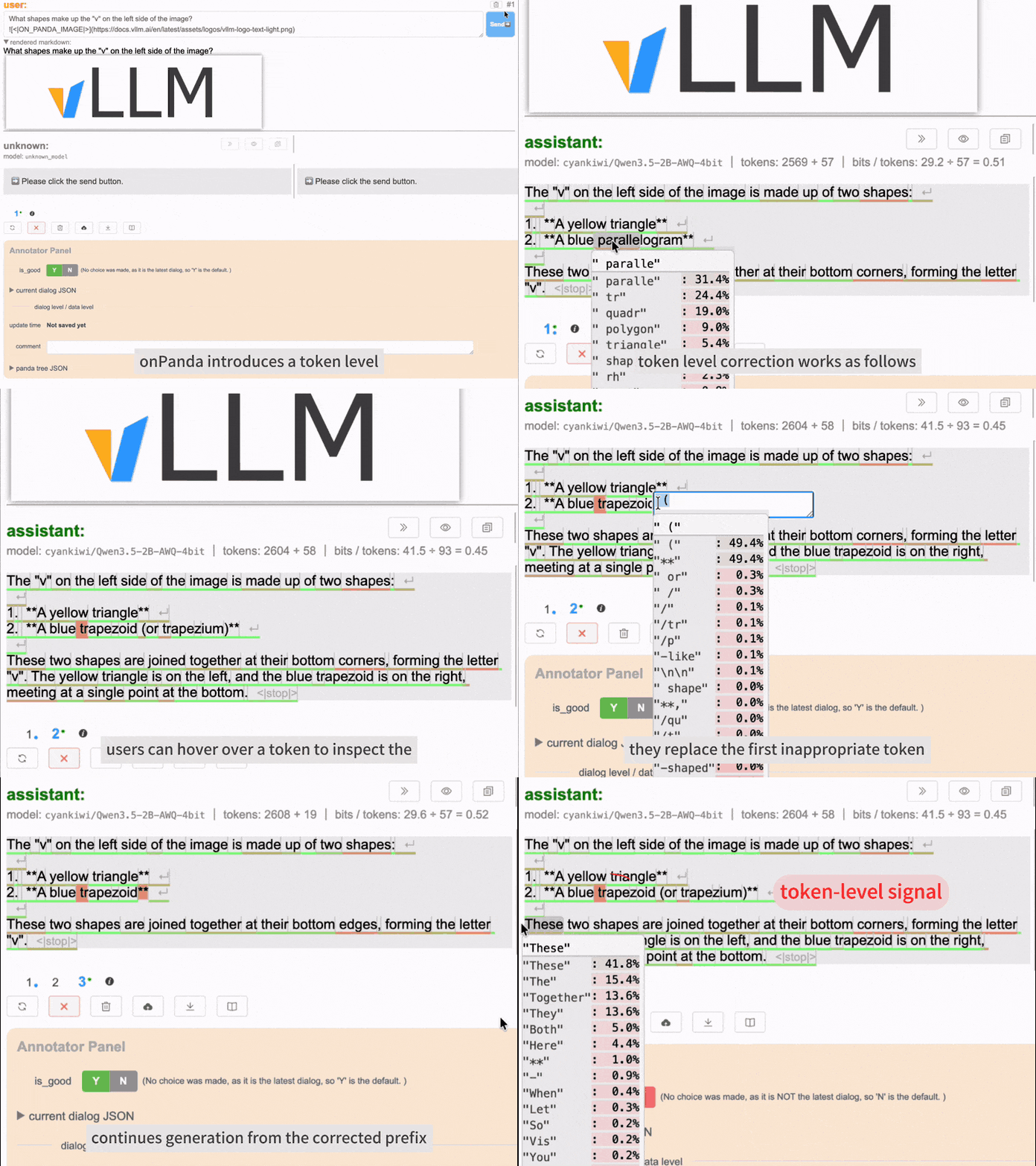
For multi-turn agent trajectories, onPanda seamlessly extends this "locate–correct–continue" loop to reasoning chains and tool calls:
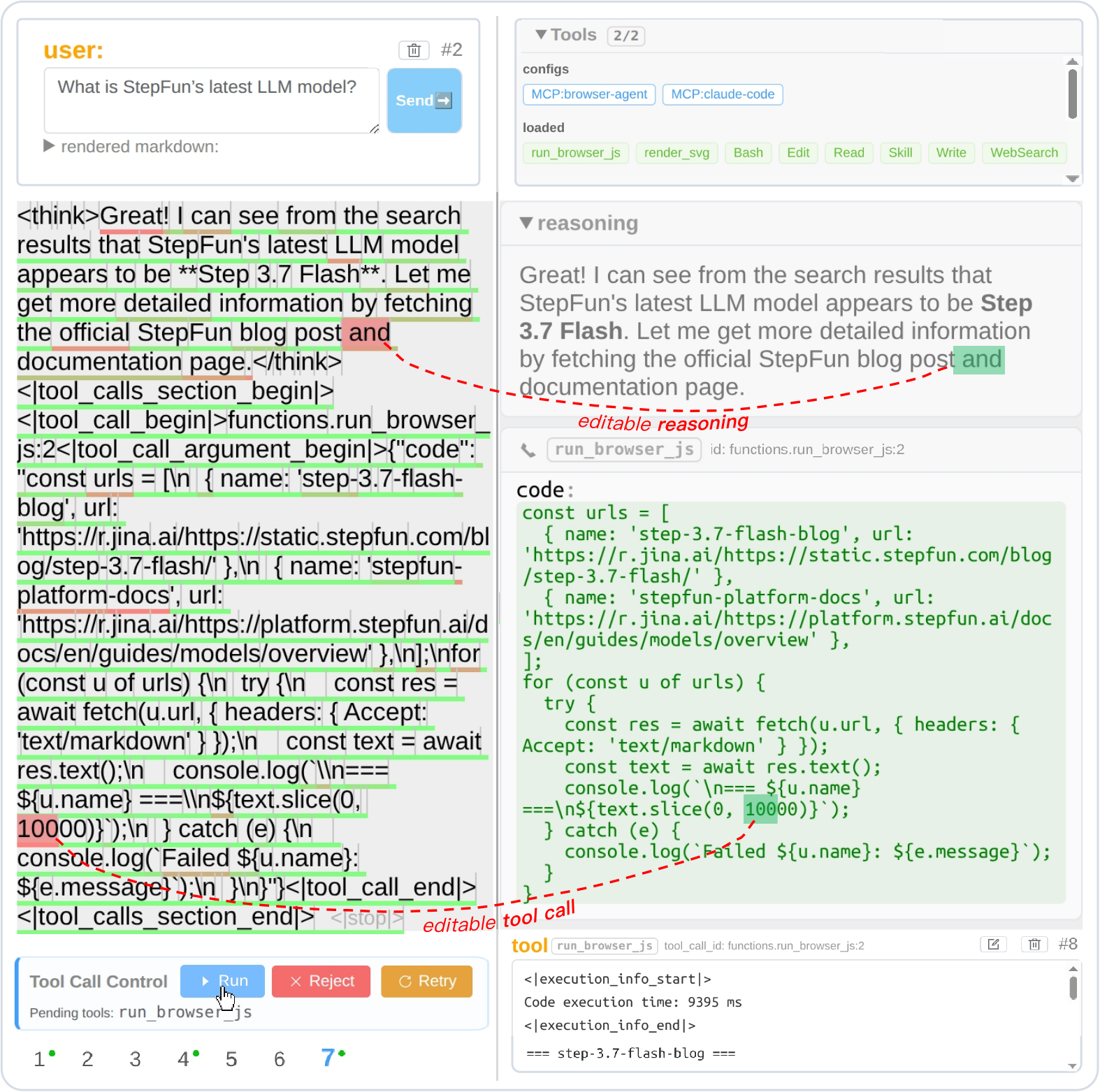
As shown above, onPanda's agent annotation interface features three core mechanisms:
- Synchronized dual-view editing: Through bidirectional conversion via the Response Template, annotators can click candidates or edit tokens directly in the structured
reasoningandtool_callspanels on the right, or modify the model's native token stream on the left (even inserting special tokens such as</think>to truncate overly long reasoning). - Pre-execution interception (Tool Call Control): Execution pauses before a tool modifies the environment. Annotators can fix
tool_callsarguments before clicking Run to approve execution, or click Reject to decline the call (optionally with textual guidance so the model can replan). - Automatic annotation tree branching (
1~7at the bottom): Every prefix edit or rejected tool call is automatically saved as a separate branch, naturally forming preference pairs under the exact same context prefix.
👉 Try it now: Open the agent-annotate example in the live demo to explore and test it yourself.
Connect your own agent tools and environment
Annotating agent trajectories in onPanda relies on real environment feedback and supports two ways to connect the target environment:
- Native MCP integration: onPanda natively supports MCP (Model Context Protocol). Any tool environment exposed as a Streamable HTTP MCP Server can be connected directly to the annotation workflow.
- Existing agent harness integration: If your target environment is an existing agent framework (harness), the companion harness_to_mcp tool wraps the harness's internal tools and runtime environment into an MCP Server for onPanda.
harness_to_mcpnatively supports Claude Code, Codex, and OpenCode. To support another custom harness, a coding agent can quickly implement an adapter by referencing the existing ones.
To connect, simply specify the MCP server URL in tool_configs within your annotation data and set "require_approval": "always" to enable human interception and approval before tool execution (see the .panda.json Data Format Specification):
{
  "version": "2.0",
  "dialogs": {
    "1": {
      "messages": [{ "role": "user", "content": "What tools do you have available?" }],
      "tool_configs": [
        {
          "type": "mcp",
          "server_url": "http://127.0.0.1:9330/mcp",
          "server_label": "claude-code",
          "require_approval": "always"
        }
      ]
    }
  }
}
Beyond environment integration, token-level correction requires an inference API that supports continuing generation from an assistant prefix (such as vLLM's continue_final_message), candidate selection relies on top_logprobs, and continuation within reasoning and tool_calls is handled automatically by built-in Response Templates. For supported inference engines (vLLM, SGLang, llama.cpp) and hosted API providers, see API Compatibility.
Benefits of the token-level correction paradigm
Compared with traditional manual post-editing or multi-sample preference ranking, onPanda's token-level correction workflow offers several key advantages:
- 2× faster annotation: Candidate selection and local edits steer model continuation without rewriting from scratch. In our controlled study, onPanda reduced median per-item annotation time by 52% compared with manual post-editing.
- SFT and preference data from a single workflow: Final accepted responses and pre-correction/rejected branches are preserved automatically, constructing high-quality preference pairs under the exact same context prefix.
- Fine-grained token-level supervision: Every correction records the exact first-error position and paired positive/negative tokens, which can be used directly for fine-grained alignment or combined with task step boundaries to construct Process Reward data for PRM training.
- High on-policy fidelity: In StepFun's production deployment, 97.0% of tokens in qualified responses are generated by the rollout model itself; in the controlled study, perplexity shift relative to the model's resampling baseline is ΔPPL < 1%, closely preserving the model's native distribution.
- Significantly lower annotator workload: In the user study, onPanda achieved an overall NASA-TLX workload score of 3.1 (substantially lower than 5.4 for preference ranking and 6.8 for manual post-editing), while token-probability color shading helps annotators quickly spot low-confidence tokens prone to errors.
- Flexible custom attribute annotation: Also supports turn-level and dialog-level custom rubric fields, including single-choice, multiple-choice, and free-text inputs.
Annotation results are saved in a single .panda.json file and can be exported into SFT, preference, and token-level correction training datasets using the companion Python library onpanda (see also the Panda-CVL dataset and benchmark). For the full controlled experimental design and analysis, see our paper: onPanda: Efficient Annotation of On-Policy Alignment Data for LLMs and Agents via Token-Level Correction.
Start your own agent annotation project
onPanda has been used in production at StepFun to annotate hundreds of thousands of alignment data samples across vision, audio, and agent trajectory tasks. It can be used in two ways:
- Out of the box: Launch a local batch-annotation service with
@on-panda/annotate(npx @on-panda/annotate --dir {jsons dir}), or deploy the onPanda web app via static hosting; - Embedded into existing platforms: Built with a decoupled component architecture, onPanda's core annotation components can be imported as a frontend package into your team's existing annotation platform (with your platform backend handling task dispatching and collection). See onPanda Integration Examples for details.